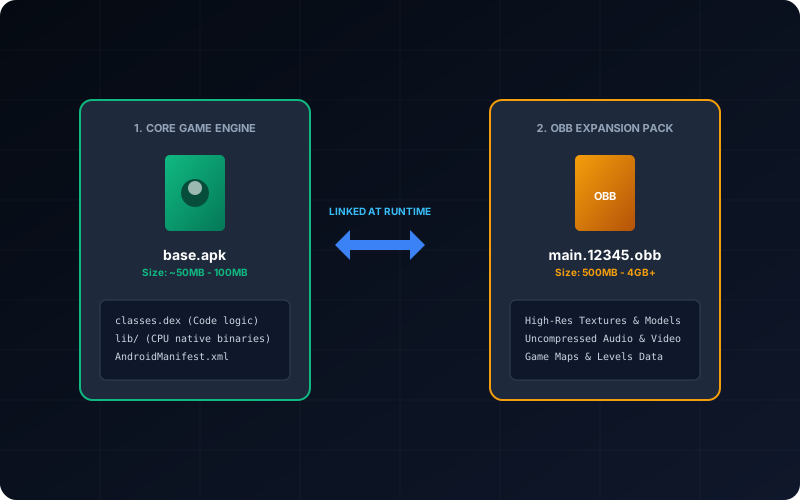
OBB files are expansion assets used by many Android games and large apps. If the APK is the launcher, OBB files usually contain heavy resources such as textures, cutscenes, audio packs, and map data. When OBB placement is wrong, the app may install successfully but fail at startup with "download failed", "resources not found", or repeated data prompts.
This guide focuses on practical installation rules that work across Android 11 to Android 14, including scoped-storage limitations and common mismatch errors.
On this page
1. What an OBB File Contains
An OBB file is not an installable app package. It is companion data read by an app that is already installed. Most OBB filenames follow this pattern:
main.<versionCode>.<packageName>.obb
patch.<versionCode>.<packageName>.obb
main typically holds the base expansion data. patch may include incremental
updates. Both must match the app package name and expected version behavior.
2. Correct Folder Path Is Non-Negotiable
Android expects OBB data in a very specific location based on package name.
| Item | Expected value | Example |
|---|---|---|
| Base folder | Android/obb on internal storage |
/storage/emulated/0/Android/obb |
| App subfolder | Exact package name | com.tencent.ig |
| Final OBB path | OBB file inside package subfolder | Android/obb/com.tencent.ig/main.12345.com.tencent.ig.obb |
If the folder name has even a small typo, the app behaves as if no expansion file exists.
3. Manual Installation Flow (APK + OBB)
- Install the APK first, but do not open it yet.
- Create or verify the package folder under
Android/obb. - Move the OBB file into that exact package folder.
- Check available free space (recommended: at least 2x OBB size before first launch).
- Launch app and allow initial validation.
Opening the app before moving OBB often triggers broken resource bootstrap attempts and confusing retry loops.
4. Android 11+ Scoped Storage Problems
On Android 11 and newer, many file managers cannot freely write inside Android/obb due
to scoped-storage restrictions. This is why users frequently see "permission denied" even with
storage access granted.
- Try the system file picker / stock Files app first.
- If blocked, use USB file transfer from desktop for reliable copy operations.
- Avoid random "all-files-access" installer apps unless source trust is strong.
Desktop transfer remains the most predictable method when scoped-storage UI behavior varies by vendor skin.
5. Common OBB Errors and Fast Fixes
| Symptom | Likely cause | Fix |
|---|---|---|
| "Download failed because resources not found" | OBB file missing or wrong folder | Recheck package folder name and final path |
| Game asks to re-download data every launch | Version mismatch between APK and OBB | Use matching APK/OBB pair from same release |
| Permission denied while moving OBB | Scoped storage restriction | Use stock Files app or USB desktop transfer |
| App installs but crashes on startup | Corrupt OBB or unsupported architecture | Redownload source and validate APK ABI compatibility |
6. XAPK as a Cleaner Alternative
Instead of manually juggling APK and OBB files, many publishers distribute XAPK containers that bundle both pieces together. If your source is XAPK, using the converter flow can reduce manual path mistakes.
Still, conversion does not replace compatibility checks. You should verify package details and Android version support before installation.
7. Security and Integrity Checklist
- Download APK and OBB from trusted release sources.
- Avoid mixing files from different app versions.
- Analyze package metadata before install when possible.
- Keep backups of working OBB folders before app updates.
- If repeated failures occur, reinstall with clean files rather than layering partial fixes.
FAQ
Can I put OBB files on SD card?
Some apps may support it, but most modern install flows assume internal storage paths. Internal storage is the safest default.
Do all Android apps need OBB?
No. OBB is mostly used by larger apps/games with assets that do not fit cleanly inside a single APK.
Why does my app still download files after OBB is placed correctly?
Usually because the app version expects newer resources than your current OBB revision.