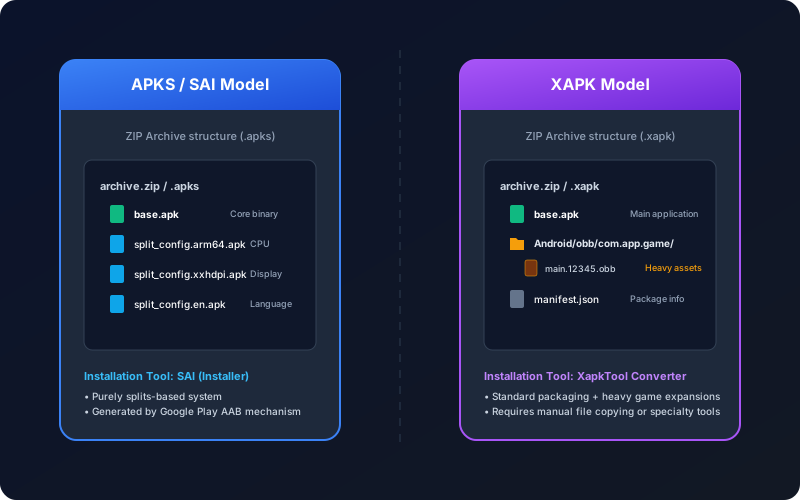
Many Android users confuse SAI and XAPK because both appear in split-package installation discussions. In reality, they solve different parts of the problem:
- SAI is an installer app focused on split APK session installs.
- XAPK is a container format that can package APK plus additional resources.
If you choose the wrong workflow, common outcomes are missing resources, partial install sessions, or repeated "App not installed" errors.
On this page
1. Core Concepts
SAI (Split APKs Installer) is a client-side installer that submits multiple APK parts in one package manager session. It is useful when you already have the correct split set and only need an installer that understands that structure.
XAPK is generally a ZIP-like container used by third-party ecosystems. It can include one or more APK files, OBB resources, and a small manifest file describing layout expectations.
So SAI is mostly an installation tool, while XAPK is a distribution format.
2. Direct Comparison
| Dimension | SAI workflow | XAPK workflow |
|---|---|---|
| Primary role | Install split APK sets via package session | Bundle app files and assets for distribution |
| Input expectation | Complete split set (base.apk + config splits) |
Container may include APK, splits, OBB, metadata |
| OBB awareness | Limited, depends on separate asset handling | Commonly used to ship OBB-heavy apps |
| Typical failure mode | Missing required split in session | Wrong extraction path or incomplete conversion |
| User friction | Requires installer app on device | Requires compatible installer or conversion flow |
3. Decision Framework by Use Case
| Your scenario | Best first choice | Why |
|---|---|---|
| You have clean split APK files from a trusted backup | SAI or equivalent split-session installer | Directly installs split set without archive conversion |
| You received a third-party XAPK with assets | Convert then install as APK flow | Reduces manual extraction mistakes and path issues |
| You need lowest-friction install for non-technical user | Single APK output workflow | Closer to native installer behavior |
4. Practical Risks and Security Tradeoffs
Both approaches are safe only when input files are trustworthy. The main risk is not the format name, but the source integrity and package consistency.
- Untrusted bundles may include tampered binaries.
- Mismatched split versions can fail install or crash at runtime.
- Extra installer apps may request broad storage access users do not expect.
Always verify source trust, check metadata, and avoid mixing files from different releases.
5. Why Many Users Convert to Standard APK
For day-to-day installation, users often prefer a single APK path because it simplifies support and troubleshooting. Converting from archive formats can reduce friction when the source package is complete and valid.
- Upload source package (
.xapk,.apkm,.apks). - Process structure and dependencies.
- Install generated APK with default package installer.
You can use the canonical converter page for this workflow, then cross-check with installation troubleshooting if needed.
6. Frequent Failure Patterns
| Error pattern | Likely root cause | First correction |
|---|---|---|
| Only base APK installs, app crashes | Missing language/ABI/density splits | Rebuild with full split set |
| Install passes, app asks for missing data | OBB not placed correctly or version mismatch | Verify OBB folder and release alignment |
| Install blocked on Android 14 | Low target SDK policy restriction | Use updated app build; avoid blind bypass |
FAQ
Is SAI better than XAPK?
They are not direct substitutes. SAI is an installer tool; XAPK is a container format.
Can XAPK include split APKs and OBB together?
Yes, that is one reason XAPK is common in large game distribution channels.
Which workflow is easier for non-technical users?
Usually a validated single-APK output flow is easiest to support and repeat.