The days when every Android application was a single, portable **APK** file are long gone. With the rise of Android App Bundles (AAB) and Dynamic Delivery, the ecosystem has fragmented into several "Container" formats designed by third-party stores. Names like **XAPK**, **APKM**, and **APKS** dominate the sideloading landscape. But what exactly is inside these packages? How do they differ architecturally? In this exhaustive guide, we dissect the three primary container formats to help you understand their internal structure and technical benefits.
Inside the Architecture
1. What is an Android Package "Container"?
A package container is simply a wrapper—usually a ZIP or Jar file—that houses multiple smaller components. Because a modern Android app requires specialized "Split APKs" (for your specific architecture, screen size, and language) or an "OBB" file (for game data), a container is needed to keep these pieces together during transport from a server to your device.
The problem is that each third-party store (like APKMirror, APKPure, and others) has invented its own custom "wrapper" format. This is because the standard Android OS doesn't have a built-in way to "install a ZIP of APKs" in a single tap.
2. XAPK (APKPure): The Hybrid Solution
Initially popularized by the APKPure team, the XAPK format was designed to solve the "OBB problem." It is a standard ZIP file with the extension renamed to `.xapk`. Internally, it can follow two different structures:
v1: Global Game Structure
Inside the XAPK, you find a single `base.apk` and an `/Android/obb/` directory. This is used for massive games that exceed the 100MB Play Store APK limit. The XAPK installer extracts the APK and manually copies the OBB into the system directory for you.
v2: Split APK Structure
Modern XAPKs contain several `.apk` files (the Base and Configuration splits) plus a `manifest.json` file that provides the installation instructions. This allows stores to serve AAB-style content while still keeping it in a single downloadable file.
3. APKM (APKMirror): The Encrypted Dynamic Format
APKM is the proprietary format developed by the APKMirror team. Unlike XAPK, it is specifically designed for **Split APK bundles** generated from Google's Android App Bundles. It focuses heavily on security and integrity.
Binary Architecture: An APKM file is an encrypted container. If you try to unzip it with standard ZIP tools, you will often find files that are not readable. This is because APKMirror uses an internal decryption layer within their own **APKMirror Installer** app to ensure that each split is served correctly. This format is the hardest to manually disassemble but arguably the most stable for complex updates.
4. APKS (SAI): The Standardized Open Format
APKS is the open standard introduced by the "SAI" (Split APKs Installer) developer. It is the most "pure" format: it is a literal ZIP file containing multiple `.apk` files without any encryption or obfuscation.
Why gamers love APKS: Because it’s an open standard, any developer can build an installer for it. It is essentially the "Universal" format for split sets. You can create an APKS file yourself simply by Zipping a folder of APKs and renaming it to `.apks`.
5. Side-by-Side Comparison: Structure and Logic
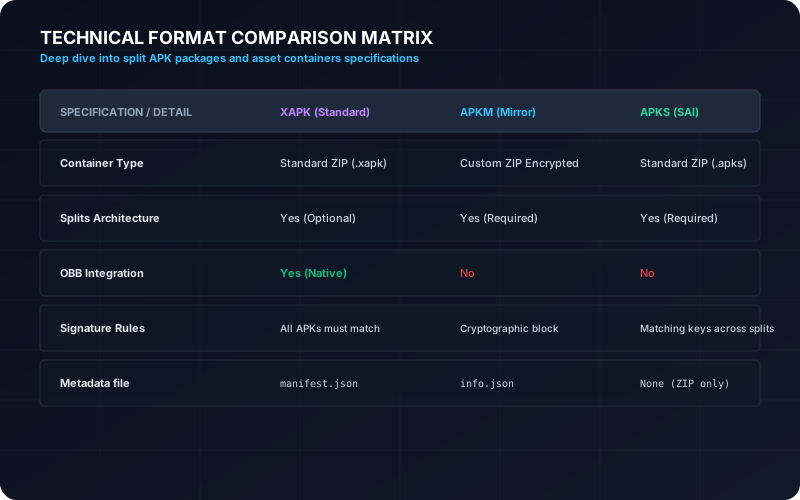
The following table summarizes the architectural differences between the three major players in the container field:
| Feature | XAPK | APKM | APKS |
|---|---|---|---|
| File Format | ZIP (Renamed) | Proprietary/Encrypted | ZIP (Renamed) |
| Multi-Split Support | Yes | Excellent (AAB derived) | Yes (Standard list) |
| OBB Support | Yes (Integrated) | No (Splits only) | No (Usually APKs only) |
| Open Origin | Partially (Manifest is JSON) | No (Proprietary) | Yes (Fully Open) |
6. Conversion Mechanics: Why and How?
Why would you want to convert these formats back to a single APK? There are three main technical benefits:
- Legacy Compatibility: Android versions older than 5.0 (Lollipop) do not understand "Splits." Converting them to a "Universal APK" allows them to run on older hardware or emulators.
- Easier Backup: A single file is much easier to manage in your local storage than a folder of 15 different splits.
- Tool Support: Many simple security scanners and analysis tools can only accept monolithic APK files. Our XAPK to APK tool performs this "merging" logic in the cloud or on-device to ensure your app remains functional and signed correctly.
7. Frequently Asked Questions
Can I just rename a .zip to .xapk or .apks?
Yes, but it will only work if the internal structure is correct. An XAPK requires a `manifest.json` file at the root, whereas an APKS just needs the raw APK splits. Rename with caution.
Which format should I use for archival?
For long-term storage, we recommend APKS. Its open structure ensures that even if a specific store goes offline, the files can be extracted and installed using any standard tool.
Does XAPKTool handle all these formats?
Yes. Our online converter is designed to parse XAPK, APKM, and APKS containers. It identifies the splits, checks the architecture, and handles the conversion or re-packaging for you automatically.