For over a decade, the **APK** (Android Package) was the undisputed standard for Android app distribution. Whether from the Play Store or a third-party site, a single file contained everything the app needed. However, in 2018, Google shifted this paradigm with the introduction of **Android App Bundles (AAB)**. Today, monolithic APKs are a relic of the past for new apps on Google Play. In this technical deep dive, we explore why AABs exist, how they generate **Split APKs**, and why this makes sideloading much more complex than it used to be.
Inside this overview
1. What is an Android App Bundle (AAB)?
An Android App Bundle (.aab) is a publishing format that includes all your app’s compiled code and resources but **defers APK generation and signing** to the Google Play Store. It is not an installable file; you cannot "sideload" an AAB directly to your phone. Instead, it is a development artifact that Google’s servers consume.
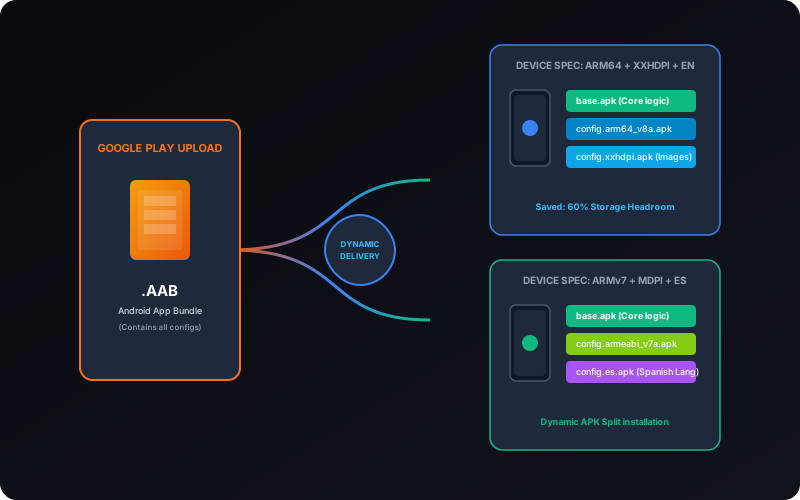
When a developer uploads an AAB, Google uses a tool called bundletool to inspect the bundle and generate specialized APKs tailored for 10,000+ different device configurations. This means that if you have a high-end Samsung tablet and a budget Pixel phone, they will actually download different files even for the exact same app.
2. Dynamic Delivery: How Google Play Serves Your Device
Google Play employs a system called **Dynamic Delivery**. When you click "Install," the store checks your device metadata:
- ABI (CPU Architecture): Is it ARMv7, ARM64-v8a, or x86_64?
- DPI (Screen Density): Is it hdpi, xxhdpi, or even larger?
- Language: What language is currently set in your system?
Based on this, it "bundles" only the relevant files into a package set. If your phone only understands English and has an ARM64 processor, why waste 50MB on Russian translations and x86 code? Dynamic Delivery strips away the bloat.
3. Types of Split APKs
When an AAB is processed, it is broken down into three categories of splits. To install the app successfully, you need at least the first two:
Base APK
This is the skeleton of the app. It contains the main Java/Kotlin code, the AndroidManifest.xml, and the essential resources that are common to all devices. Without the Base APK, the app has no foundation.
Configuration APKs
These are separate files that contain resources specific to your device's configuration. They include images for your screen density, compiled libraries for your CPU (Native libraries), and your system language strings. A typical install might involve one Base APK and 3 or 4 Configuration APKs.
Dynamic Feature APKs
Some developers use "On-Demand" features. For example, a travel app might only download the "Flight Booking" feature when you actually tap on that section. These feature-specific modules are also delivered as splits.
4. Why Split APKs improve the user experience
Splitting seems complicated, but it provides significant benefits:
- Reduced App Size: Apps are typically 35-40% smaller on average. This is critical for users in regions with limited data or older devices with small storage.
- Efficient Updates: If only the main code changes (and not the high-res textures), the system can potentially only update the Base APK splits.
- Customization: Apps can deliver specific assets to specific devices (e.g., rayv-tracing textures to only the newest flagship phones).
5. The Challenge of Sideloading Split APKs
This is where things get difficult for power users. Because the app is no longer a single file, you cannot just "Share" an APK from one phone to another. If you share only the Base APK, the other phone will crash upon launch (error: "Missing resourcesException").
To sideload modern apps, you must use **Container Formats** that package multiple splits together:
| Format | Origin | Internal Structure |
|---|---|---|
| .XAPK | APKPure | Base APK + OBB data or Configuration APKs. |
| .APKM | APKMirror | A specialized zip container of encrypted/obfuscated split APKs. |
| .APKS | SAI (Split APKs Installer) | A standard ZIP containing multiple .apk files. |
6. Tools for Handling AAB and Split Packages
Because the standard Android Package Installer cannot handle multiple files at once, you need a **Split APK Installer**. These tools use the PackageInstaller session API to push multiple splits simultaneously to the system.
- XapkTool Online: Our tool extracts high-quality splits and re-packages them or converts them to a single standard APK for legacy support.
- bundletool: The official Java tool from Google for developers to test AAB locally.
- SAI (Split APKs Installer): A popular open-source Android app for installing .apks and .xapk files directly on device.
7. Frequently Asked Questions
Can I convert an AAB to an APK?
Technically, yes, using Google's bundletool. You can generate a "Universal APK" from the bundle that contains **every** possible resource. This file will be huge, but it is the only way to get a single monolithic APK from an AAB.
Why does my sideloaded app crash on startup?
If you sideloaded only the Base APK, the app is likely missing its native libraries (the `.so` files for your CPU) or its screen assets. You must use a tool that installs the configuration splits as well.
Are split APKs safer?
In terms of security, they are identical to standard APKs. They follow the same signature verification rules. However, because they are harder to modify and re-sign in chunks, they provide a very slight deterrent against casual tampering.