Digital signatures in Android serve a dual purpose: ensuring the identity of the developer and guaranteeing the immutability of the package code. Since the earliest days of Android (Dalvik and Eclair), the methodology for signing APKs has evolved from simple JAR manifest integrity to complex, kernel-level hash trees. This evolution was driven by the need for faster verification during installation and enhanced security against emerging attack vectors. In this technical guide, we analyze the binary structure and security improvements of each signature revision: v1, v2, v3, and v4.
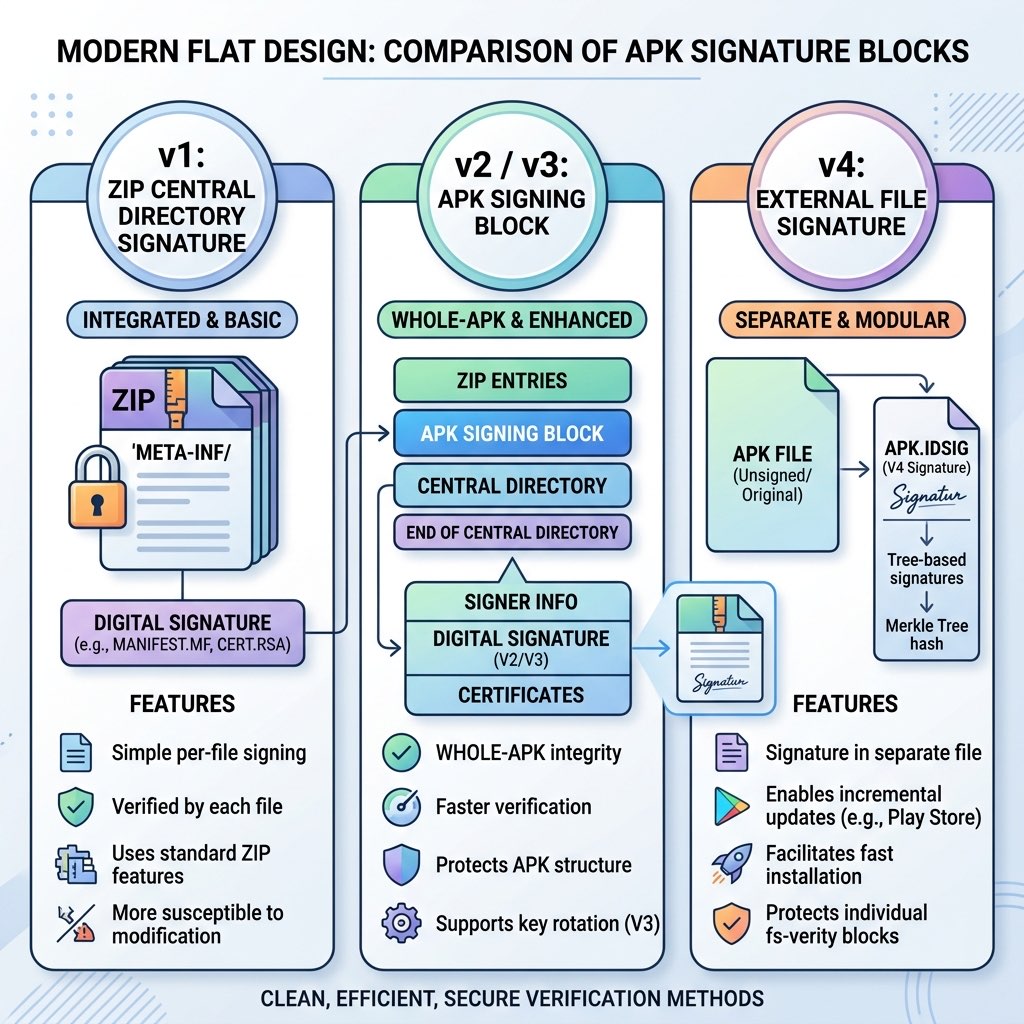
Inside the Architecture
1. v1: JAR Signing (Legacy Integrity)
The v1 scheme is based on standard JAR signing, which treats the APK as a ZIP archive of individual files. It works by creating a message digest (hash) of every file in the package and storing these digests in a MANIFEST.MF file inside the META-INF/ directory.
The Pipeline:
- Every file's hash is recorded in
MANIFEST.MF. - The
CERT.SFfile is created, signing the hashes from the manifest. - The
CERT.RSAfile contains the digital signature of theCERT.SFfile, encrypted by the developer's private key.
The Limitation: Because v1 verifies each file independently, the ZIP Central Directory itself is **not signed**. This vulnerability allowed "Zip-based" attacks (like the Janust vulnerability) where an attacker can append data to the APK file without invalidating the v1 signature. Furthermore, it causes significant battery drain and CPU usage during installation as the system must decompress and hash every single file.
2. v2: Whole File Verification (Android 7.0+)
The v2 scheme was a radical shift from internal file signing to whole-file binary signing. It introduces the **APK Signing Block**, situated between the ZIP Central Directory and the "Contents of ZIP" entries.
Binary Structure: v2 signs the entire binary contents of the APK. It ignores the v1 META-INF files but ensures that if any part of the ZIP data, Central Directory, or End-of-Central-Directory record is altered, the signature fails.
Technical Benefit: v2 verification is thousands of times faster than v1. The system reads the Central Directory, leaps to the Signing Block, and performs a single hash check. This reduced installation times by up to 50% for large apps upon its introduction.
3. v3: APK Signature Scheme v3 (Key Rotation)
Introduced in Android 9, v3 is an extension of v2 with a critical feature: **Support for Key Rotation**. Historically, if a developer lost their key, they could never update their app on Google Play again. v3 solves this with the **Proof-of-rotation Lineage** attribute.
The Mechanism: The v3 block includes a "certificate lineage" which is a linked list of old certificates, each one signed by its predecessor. This allows the OS to trust a new signing key as long as the developer can provide a valid "proof" that the owner of the old key authorized the transition to the new one.
4. v4: APK Signature Scheme v4 (Incremental Installation)
With the rise of "AAA" mobile games reaching sizes over 5GB, waiting for a full download and a v2/v3 whole-file verification is increasingly problematic. Scheme v4 (Android 11+) introduced **Incremental Installation** via a separate companion file (.apk.idsig).
Technical Deep Dive: v4 doesn't just sign the file; it builds a **Merkle Tree** (hash tree) of the entire APK's content. This tree is stored in the .idsig file. The Android kernel (using fsverity) uses this tree to perform on-the-fly verification of each page of memory as it is read from the storage. This allows the game to start as soon as the first few levels are downloaded, while the rest of the data is verified "on the fly" as it streams in.
5. Performance and Security Benchmarks
The following table compares the computational overhead and protection level of the various schemes:
| Scheme | Verify Speed | Security Level | Kernel Requirement |
|---|---|---|---|
| v1 | Slow (File-by-file) | Low (ZIP structure vulnerable) | None |
| v2 | Fast (Binary Block) | High (Full-file integrity) | None |
| v3 | Fast (Binary Block) | Extreme (Adds Key Rotation) | None |
| v4 | Streaming (On-the-fly) | Maximum (fs-verity protected) | Android 11+ (Linux 5.4+) |
6. Recommendations for Modern Development
What should you use today? If you are a developer using Gradle 7.0+ or the latest Android Studio, the default configuration is best because it handles multiple signature layers automatically.
- Sign with all applicable versions: Modern apps should be signed with v1 (for legacy), v2/v3 (for performance), and v4 (for Play Store incremental support).
- Protect your Keystore: Regardless of the scheme version, the security of your private key is non-negotiable. Use Hardware Security Modules (HSM) or Google Play Console's App Signing feature if possible.
- Verify Output: Always use
apksigner verifyas part of your CI/CD pipeline to ensure your build tools haven't accidentally broken the signature chain.