When you tap "Install" on a sideloaded APK, you're initiating a complex, multi-stage orchestration within the Android OS. This process is governed by the **PackageInstaller** API—a sophisticated system service that manages the full lifecycle of application deployment. From simple monolithic APKs to the complex, session-based world of Split APKs, understanding the internal mechanics of the installer provides deep insight into how Android maintains security boundaries while ensuring high-performance app delivery. In this technical deep dive, we explore the plumbing of the PackageInstaller service and how it manages user consent, signature verification, and binary deployment.
Inside the Service
- What is the PackageInstaller? (API Overview)
- The Pipeline: Sessions and Streaming Data
- How Split APKs are Handled: Session IDs and Grouping
- User Consent and "Install Unknown Apps" Security
- The Importance of OBB and Data Placement
- Security Boundaries: Why Silent Installs are Restricted
- Common API Exceptions and Error Codes
- Frequently Asked Questions
1. What is the PackageInstaller?
The PackageInstaller (introduced in Android 5.0 Lollipop) is a system service that resides within the system_server process. It replaces the legacy pm install (Package Manager) command-line tool with a more robust, session-based API. It acts as the final gatekeeper that moves a binary from an untrusted location (like your Downloads folder) to the secured system partition (/data/app/).
2. The Pipeline: Sessions and Streaming Data
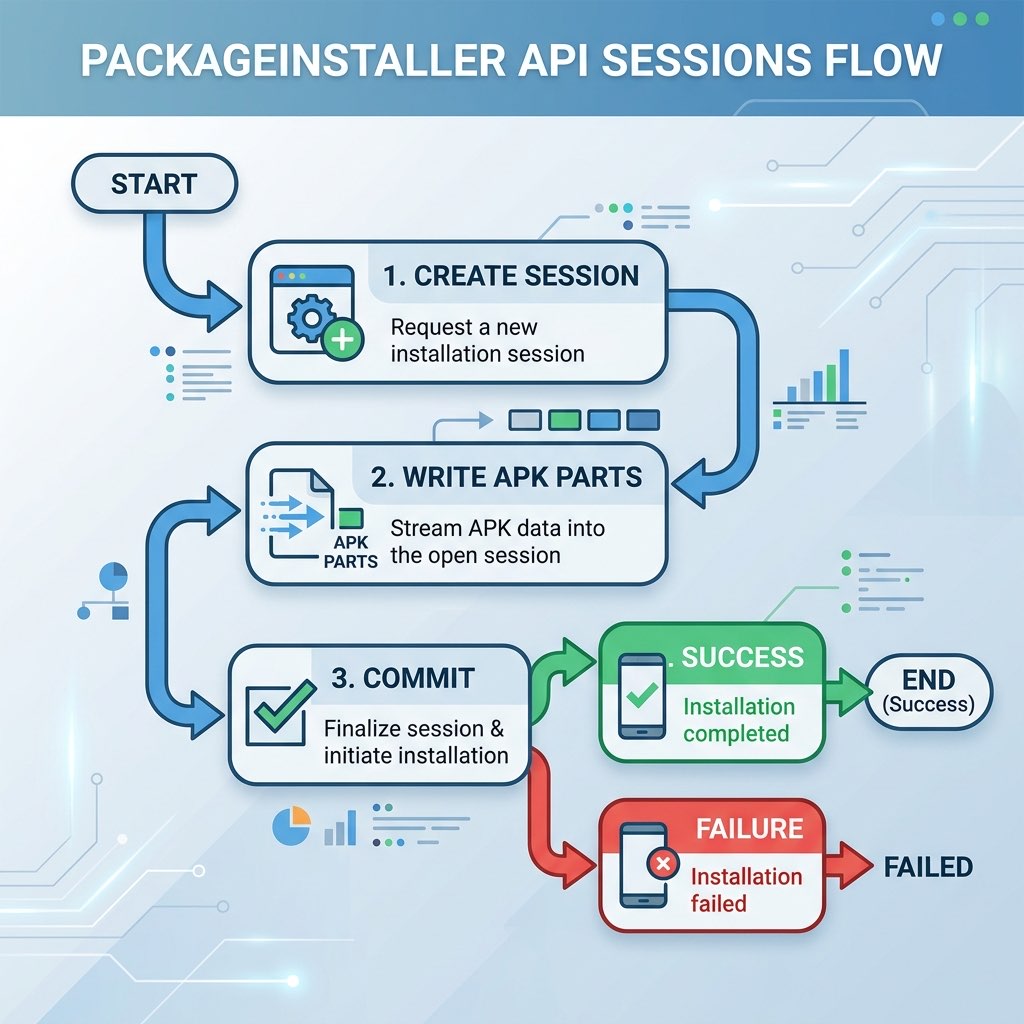
Unlike old installation methods that required the OS to copy a completed file from storage to system, the modern PackageInstaller uses a Session-based Pipeline. This is critical for performance, especially during downloads.
- Session Creation: The installer app (like XapkTool or SAI) starts a new install session, which receives a unique
sessionId. - Streaming: The installer opens an "output stream" to the session. It "pipes" the binary data directly into the system's staging area.
- Commit: Once all bytes are moved, the installer "commits" the session. This is the only point where the phone's CPU performs the heavy signature verification and package analysis.
- Abandon: If anything goes wrong, the session is "abandoned," and no trace remains in the system partition.
3. How Split APKs are Handled
One of the primary reasons for the PackageInstaller's session-based design is to support Split APKs. In a single session, you can open multiple streams simultaneously—one for the base.apk, another for the split_config.arm64_v8a.apk, and yet another for the language resource splits.
The OS treats these files as a single, logical deployment. It ensures that all pieces are signed by the same certificate. If even one split doesn't match the signature of the base APK, the entire session fails to commit. This prevents an attacker from trying to "mix and match" malicious splits into a safe app.
4. User Consent and "Install Unknown Apps" Security
Before any session can be committed for a sideloaded app, Android must obtain explicit user consent. This is handled via a **System Intent**. The OS checks the installer app's manifest for the REQUEST_INSTALL_PACKAGES permission. It then prompts the user to "Allow installs from this source."
On Android 10 and above, this is a refined per-app permission, not a global system toggle. This prevents a "compromised" calculator app from installing malware in the background without your knowledge.
5. The Importance of OBB and Data Placement
While the PackageInstaller handles the binary code (APK), large game data (OBB files) are handled at the app-level. The installer service creates the /Android/obb/com.package.name/ directory, but it expects the installer app to place the files there manually. This bifurcation is why XAPK conversion is so valuable—it coordinates these two separate system workflows into one seamless action.
6. Security Boundaries: Why Silent Installs are Restricted
A "Silent Install" (installation without a user-facing prompt) is only allowed for **Device Owners** (managed enterprise devices) or apps with the INSTALL_PACKAGES signature-level permission (which is only granted to system apps like Google Play or manufacturer-signed installers). For standard users, the lack of silent installs is a primary defense against "drive-by" malware downloads from malicious websites.
7. Common API Exceptions and Error Codes
| Status Message | Technical Context |
|---|---|
| [INSTALL_FAILED_INVALID_APK] | The binary structure is corrupted or doesn't follow basic ZIP/DEX standards. |
| [INSTALL_FAILED_UPDATE_INCOMPATIBLE] | The new package signature doesn't match the one currently installed on the device. |
| [INSTALL_FAILED_INSUFFICIENT_STORAGE] | The system partition (not just external storage) has run out of space during the binary stream. |
8. Frequently Asked Questions
Can I view the PackageInstaller logs?
Yes. If you have ADB, you can run adb logcat -s PackageInstaller during an installation to see the real-time session progress and any underlying reason for failure.
How does XapkTool help with these API calls?
Our online tools identify which splits are required for your device and verify that the signature is consistent across all files before you download them. This minimizes the risk of a "Failed to Commit Session" error at the OS level.
Is the PackageInstaller faster than old methods?
Yes. By moving to a streaming model, it eliminates the "buffer" step where the app had to be fully copied before verification started. Now, verification starts as the bits arrive.